
You want to send a newsletter, stay in touch with customers and bring a few more people back to your website, ideally, without spending half your working week learning another piece of software.
Then you start comparing email marketing platforms. Suddenly, you’re looking at contact limits, automation flows, audience segments and four different pricing plans. So much for keeping things simple.
If you’re weighing up MailerLite vs Mailchimp, both deserve a look. However, the right choice depends on what you need your emails to do, how often you’ll send them and which tools your business already uses.
Our starting recommendation? Put MailerLite on your shortlist if you want straightforward newsletters and useful automation on a small budget. Consider Mailchimp if you need its particular integrations or more advanced marketing features, and you’re happy to pay for the relevant plan.
Let’s break down what that actually means for a small business.
*Plan information checked in November 2026. Features, prices and limits can change, so check the providers’ current pricing pages before signing up.
- What Do MailerLite and Mailchimp Actually Do?
- MailerLite vs Mailchimp at a Glance
- Which Has the Better Free Plan?
- How Do the Paid Plans Compare?
- Which Is Easier to Use?
- Email Design: Can Both Look Professional?
- Automation: What Happens After Someone Signs Up?
- Organising Your List Without Making It Complicated
- Forms, Landing Pages and Your Website
- Integrations: Will It Work With Your Existing Tools?
- Reporting: Look for Useful Results
- Which Would We Choose for a Small Business?
- Start With One Useful Campaign
What Do MailerLite and Mailchimp Actually Do?
Both platforms help you send marketing emails to people who’ve joined your mailing list. For example, you might share helpful advice, introduce a new service, promote an event or send a monthly update.
They also provide tools to collect subscribers and organise your audience. That makes them more useful for newsletters than trying to manage everything through your everyday email inbox.
If you’re starting from scratch, our friendly guide to email marketing for small businesses explains the basics.
Before choosing a platform, write down your first three jobs for it. These might be collecting newsletter sign-ups, sending a welcome message and publishing one useful email each month.
That small list will help you compare the features you’ll actually use.
MailerLite vs Mailchimp at a Glance
Here’s a practical starting point for your comparison:
| Free audience limit | 250 active subscribers | 250 contacts |
| Free monthly email allowance | 2,500 emails | 500 emails, with a 250 daily limit |
| Users on the free plan | Two | One |
| Main paid marketing plans | Comfort and Power | Essentials, Standard and Premium |
| Automation starting point | Limited automation on Free | Check paid plans for automation features |
| Why we’d shortlist it | Newsletters and simple automated follow-ups | Specific integrations and broader marketing requirements |
Sources: MailerLite pricing and Mailchimp pricing.
The final row is our recommendation, rather than a claim that either platform only suits one type of business. Both can support a growing company. The question is which gives you the right tools at a cost you can justify.
Which Has the Better Free Plan?
For a small list that you want to email regularly, we’d start with MailerLite.
Its free monthly sending allowance gives you more room to experiment. MailerLite also includes up to three automations and three forms on the Free plan. That creates a useful starting point for collecting subscribers and planning a welcome sequence. See its free plan update for the detailed limits.
However, don’t confuse subscribers with sends.
If you send one newsletter to 200 people, you’ve used 200 sends. Then if you send those same people another newsletter, your total becomes 400.
Consequently, four newsletters to 200 subscribers would use 800 sends before any welcome emails or other messages. That fits within MailerLite’s current free allowance but exceeds Mailchimp’s.
On the other hand, if you have 100 contacts and only send a monthly update, either free plan may cover your initial needs.
Also, a free trial isn’t the same as a free plan. During a trial, you may see tools that disappear when the trial ends. Before building your campaign around a feature, check whether you’ll keep it if you don’t upgrade the plan.
How Do the Paid Plans Compare?
Comparing the headline starting prices won’t tell you enough. Your actual bill depends on your audience size, sending volume and required features.
MailerLite now calls its main paid plans Comfort and Power. If you’ve seen references to Growing Business and Advanced, those are the earlier names. Its paid plan update explains the change.
Mailchimp offers Essentials, Standard and Premium alongside Free. Its UK pricing page displays estimated sterling prices, which can vary with exchange rates, and excludes applicable taxes. Therefore, check the checkout total rather than treating a search result’s price as a fixed quote.
For a useful comparison, price both services against the same brief:
- Your current audience size.
- A realistic audience size in 12 months.
- The total emails you expect to send each month.
- The automation features you need.
- The number of people who need account access.
For example, 1,000 subscribers receiving four newsletters would require 4,000 sends. You’d then add room for welcome messages and other automated emails.
Pay attention to contact counting, too. Mailchimp includes subscribed, unsubscribed and non-subscribed contacts in its marketing contact count, while archived and cleaned contacts don’t count. Duplicating a contact across audiences can also increase your bill. MailerLite’s billing considers active subscribers and email volume, including subscribers who were active during the billing period. Sources: Mailchimp audience guidance and MailerLite billing guidance.
Our advice is to compare the ongoing cost of the plan you need, rather than choosing whichever introductory offer looks cheapest.
Which Is Easier to Use?
Ease of use is personal. A platform that feels obvious to one person can feel completely backwards to another.
For a business owner who mainly wants to publish newsletters, we’d test MailerLite first. For someone who already knows Mailchimp or works with a team that uses it, familiarity may make Mailchimp the easier choice.
Instead of relying on screenshots, try the same task in both platforms:
- Add your logo and brand colours.
- Create a short newsletter with one image and one button.
- Preview it on mobile.
- Send yourself a test.
- Find the campaign reporting area.
Notice where you get stuck. Can you work out how to change the button text? Is it clear which audience will receive the email? Can you find help when something doesn’t behave as expected?
You’ll repeat these jobs regularly, so small frustrations matter. The platform you feel comfortable using is more likely to become part of your routine.
Email Design: Can Both Look Professional?
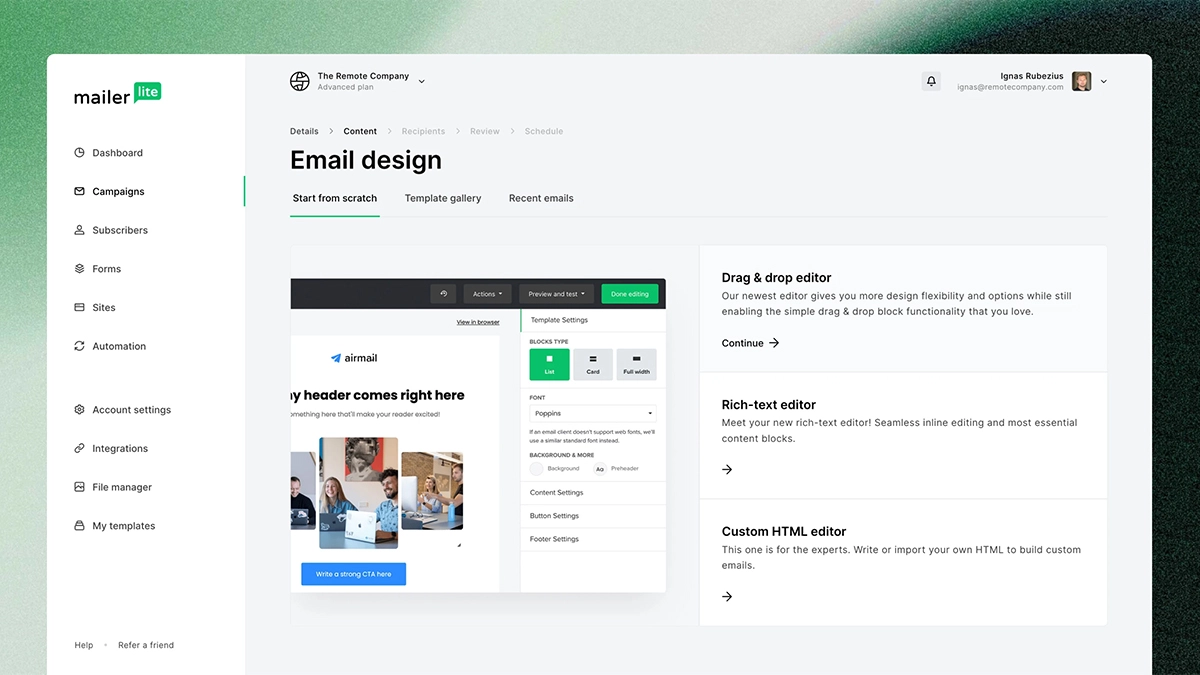
Yes. Both offer tools for building branded emails, although template access and editing features depend on your plan.
However, a professional newsletter doesn’t need to resemble a glossy catalogue. Often, a short introduction, one helpful idea and a clear next step will do the job nicely.
For example, a local garden centre could send seasonal planting advice followed by a link to its latest plants. Meanwhile, an accountant could answer one common question and invite readers to book a call.
When testing either platform, focus on readable text, clear buttons and a layout that works on your phone. Also, make sure your message still makes sense if the images don’t load.
If you’re stuck on content, our 20 newsletter ideas for small businesses will give you somewhere to start.
The template should help people read your message. It shouldn’t become the main event.
Automation: What Happens After Someone Signs Up?
Automation sends a message when someone takes a particular action. That could mean welcoming a new subscriber or following up after they request a guide.
For a small business, this can save time while giving new contacts a more helpful introduction.
MailerLite includes limited automation on Free, while its paid plans expand the available capacity and capabilities. Mailchimp’s Essentials plan currently supports automation flows with up to four steps, while Standard provides expanded automation features. Check the Mailchimp plan breakdown before building a sequence around a particular feature.
Start by drawing out the emails you want to send. For example, a personal trainer might plan:
- An immediate welcome email with a beginner’s checklist.
- A follow-up sharing a practical exercise tip.
- A later invitation to book an introductory session.
Then check whether each plan supports the triggers, delays and conditions that sequence requires. A trigger starts the sequence; a condition decides which route someone takes through it.
You don’t need a complicated system on day one. One useful welcome email is a perfectly sensible place to begin.
Organising Your List Without Making It Complicated
Not every subscriber wants the same information.
A clothing shop might have customers interested in different product ranges. Similarly, a consultancy could have prospects researching a service alongside existing clients who need ongoing advice.
Splitting those people into relevant categories helps you avoid sending everything to everyone.
MailerLite uses groups and segments to organise subscribers. Groups work as labels, while segments update according to rules you set. Its groups and segments guide explains the distinction.
Mailchimp also offers audience organisation tools, with more advanced segmentation available on Standard and above.
For your first setup, keep the categories useful and manageable. “Interested in workshops” gives you a clear reason to send someone a workshop announcement. Twenty overlapping labels that nobody understands will mostly create admin.
Our guide to segmenting your email list explores how to put this into practice.
Forms, Landing Pages and Your Website

Your email platform needs a reliable way to collect subscribers. Both services offer forms and landing page tools, subject to their plan limits.
However, think about the experience from your visitor’s point of view. Why should they sign up? What will they receive? What happens after they submit the form?
“Get a useful monthly tip for looking after your garden” gives someone more reason to subscribe than a lonely box labelled “Newsletter”.
Next, decide where the sign-up page should live. A simple campaign page inside your email platform may suit a quick test. Meanwhile, an important service campaign may benefit from a page on your own website, with more room for examples, testimonials and answers to common questions.
We cover those choices in our guide to website landing pages versus email tool landing pages.
Whichever route you choose, test the whole journey. Submit the form, check the confirmation and make sure the right email arrives. If the website itself needs attention, our web design services can help you create a clearer journey.
Integrations: Will It Work With Your Existing Tools?
An integration connects your email platform to another tool, such as your website, online shop or booking system.
Both providers list connections for common business tools. For example, MailerLite offers a WooCommerce integration, while Mailchimp lists WooCommerce, Shopify and WordPress among its available integrations.
However, finding your software’s logo on a list is only the first check.
Ask what information the connection actually passes across. Does it record newsletter sign-ups? Does it bring in purchase history? Can it support the follow-up you want to send? Will you need a separate paid connector?
For an online shop, those details may matter more than a small difference in subscription price. Conversely, a service business sending one monthly newsletter may only need a reliable sign-up form.
Choose based on the connection you need, rather than the total number of integrations a platform advertises.
Reporting: Look for Useful Results
Your campaign report should help you decide what to do next.
Rather than collecting numbers for the sake of it, give each email one main goal. Perhaps you want readers to visit a new service page, register for a workshop or reply with a question.
Then review the result against that goal. If people click through but nobody enquires, inspect the landing page and offer. If few people click, review whether the email gives them a clear reason to take action.
When testing MailerLite vs Mailchimp, look for the reports you’ll actually use and check which plan includes them. A small business with limited time may benefit more from a report it understands than a dashboard full of options it never opens.
Also, don’t assume switching platforms will automatically improve inbox placement. Review your sending setup, audience quality and content first. Our guide to stopping your emails going to spam explains what to check.
Which Would We Choose for a Small Business?
For a startup beginning with newsletters, a sign-up form and a simple welcome sequence, we’d usually test MailerLite first. Its current free sending allowance gives a small audience more room for regular communication.
However, we’d choose Mailchimp when a specific integration, reporting requirement or paid marketing feature makes it the better fit. Paying more can make sense if the feature saves meaningful time or supports a campaign you’ll actually run.
If you already use Mailchimp successfully, don’t move simply because another platform looks attractive. First, identify the problem you want to solve. Then compare the saving or improvement against the work involved in rebuilding forms, templates and automations.
The same applies in reverse. A platform change needs a practical reason.
Start With One Useful Campaign
You don’t need to master every feature before sending your first newsletter.
Choose the platform that covers your immediate needs, connect your sign-up form and create one email that gives your audience something useful. Then build from there.
When comparing MailerLite vs Mailchimp, the best choice is the one that fits your budget, works with your business and helps you send consistently.
Need help connecting your emails with the rest of your marketing? Explore our website marketing services or get in touch. We’ll help you work out a sensible next step.