Email campaigns can be a brilliant way to get people to take action.
You might be promoting a new offer, launching a service, collecting enquiries, selling tickets, sharing a lead magnet, or encouraging people to book a call. Whatever the goal, the email itself is only one part of the journey.
The other important part is where people go after they click.
That is where your landing page comes in.
A landing page is the page someone lands on after clicking a link in your email campaign. In simple terms, it is the page that does the heavy lifting after the email has grabbed their attention.
However, this is where lots of small businesses get stuck.
Should you build that landing page on your own website? Or should you use the landing page feature inside your email marketing platform, such as MailerLite, Mailchimp, Brevo, ActiveCampaign or similar?
Both options can work. Annoying, but true.
The best choice depends on what you are trying to achieve, how much control you need, how quickly you need the page live, and what tools you already have in place.
In this guide, we will break down the pros and cons of each option, explain when each makes sense, and offer a practical recommendation for small businesses or startups trying to keep things simple.
- A Quick Comparison
- First, What Is an Email Campaign Landing Page?
- Option 1: Building Landing Pages on Your Website
- The Pros of Building Landing Pages on Your Website
- The Cons of Building Landing Pages on Your Website
- Option 2: Using Your Email Marketing Tool’s Landing Page Feature
- The Pros of Using an Email Tool Landing Page
- The Cons of Using an Email Tool Landing Page
- So, Which Option Is Best?
- What About Using Both?
- Our Recommendation for Small Businesses and Startups
- Final Thoughts
A Quick Comparison
| Website landing page | Email tool landing page | |
|---|---|---|
| Best for | Important campaigns, core services, SEO-focused pages and long-term use | Quick campaigns, lead magnets, sign-ups and short-term tests |
| Setup speed | Usually takes longer to build and test properly | Usually quicker and easier to publish |
| Brand control | Stronger control over design, layout, fonts, colours and user experience | More limited, often based on templates |
| SEO value | Better potential if the page targets a useful search term | Usually limited SEO value |
| Tracking | Better for wider website analytics and conversion tracking | Good for email sign-ups, but data can be more isolated |
| Email automation | Needs form integration with your email platform | Usually built in and easier to manage |
| Trust factor | Stronger, as visitors stay on your own domain | Can feel less polished if hosted on a platform URL |
| Flexibility | Better for detailed pages with testimonials, FAQs, pricing or case studies | Better for simple pages with one form and one action |
| Long-term value | Can become part of your main website and marketing strategy | Better suited to temporary or campaign-specific pages |
| Best overall use | When the campaign matters beyond one email send | When you need something simple, fast and functional |
First, What Is an Email Campaign Landing Page?
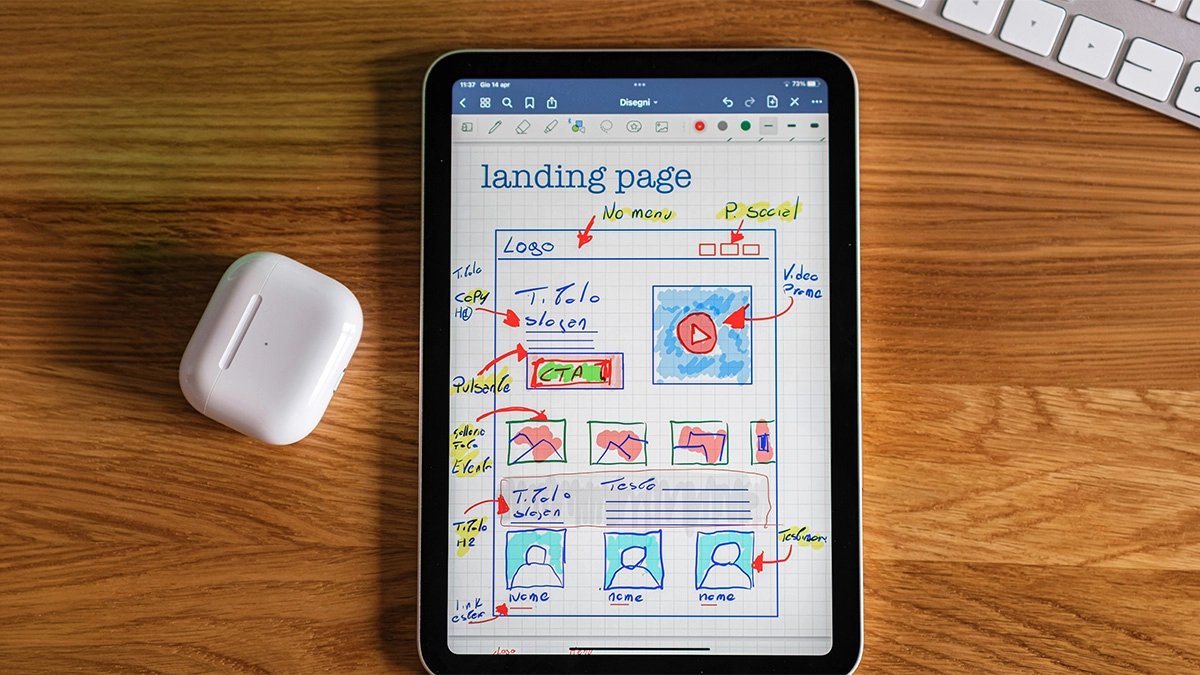
An email campaign landing page is a page built for one specific campaign or action.
Unlike a normal website page, it usually has a focused purpose. For example, it might ask people to:
- Book a consultation
- Download a guide
- Register for an event
- Claim an offer
- Buy a product
- Join a waiting list
- Complete a form
- Make an enquiry
The keyword here is focused.
A good landing page should not try to do everything. It should continue the message from the email and guide the visitor towards a clear next step.
For example, if your email says, “Download our free guide to improving your small business website,” the landing page should make that download easy. It should not suddenly send people off to your homepage, your full list of services, your blog archive and your Instagram feed.
That is asking too much.
The email creates the interest. The landing page turns that interest into action.
Option 1: Building Landing Pages on Your Website
The first option is to build your email campaign landing page directly on your website.
For most small businesses, this usually means creating a new page in WordPress, Shopify, Squarespace, Wix or whatever platform your website uses.
For example, you might create a page like:
yourwebsite.co.uk/free-guide
or
yourwebsite.co.uk/summer-offer
or
yourwebsite.co.uk/book-a-consultation
This page sits on your main website and uses your own domain name. It can be designed to match your brand, include your usual tracking, and sit alongside the rest of your online presence.
Let’s look at the main benefits.
The Pros of Building Landing Pages on Your Website
1. It Keeps Everything Under Your Own Brand
One of the biggest advantages of using your website is brand consistency.
Your website already has your logo, colours, fonts, tone of voice and overall look. So, when someone clicks from your email to your website, the experience feels joined up.
That matters.
If someone clicks an email and lands on a page that looks completely different, they may feel unsure. They might wonder if they have gone to the right place. Even small things like a different URL, different styling, or a slightly clunky template can create doubt.
That doesn’t mean email tool landing pages always look bad. Some can look perfectly fine. However, your own website usually gives you more control over how everything feels.
For small businesses, trust is huge. A consistent experience helps people feel more confident that they are dealing with a proper, professional business.
2. You Have More Design Flexibility
When you build landing pages on your own website, you usually have far more control over the design and layout.
You can create sections that fit the campaign properly. You can add custom visuals, testimonials, FAQs, embedded videos, contact forms, product details, pricing tables, or anything else you need.
You are not restricted by the email platform’s landing page builder.
This is especially useful if your campaign needs more than a simple form and headline. For example, if you are promoting a higher-value service, you may need a stronger page with more detail. You might want to explain the problem, show examples of your work, answer objections, and build trust before asking someone to enquire.
A website landing page gives you room to do that properly.
3. It Can Support Your SEO
This one needs a little bit of nuance.
Not every email campaign landing page needs to rank on Google. In fact, many campaign pages are short-term and are only meant for people who clicked from an email.
However, if the landing page is built around a useful topic, service or offer that people may search for, having it on your website can help support your SEO over time.
For example, let’s say you are an accountant and you send an email campaign about Making Tax Digital. Instead of building a throwaway landing page in your email tool, you could create a proper page or blog post on your website. That page could then bring in traffic from both your email list and Google.
That is a much better use of the content.
When useful pages live on your website, they become part of your wider online presence. They can be linked to, indexed, updated and reused.
Email tool landing pages, on the other hand, are usually more separate. They may not carry the same long-term value for your website.
4. You Keep Your Website As the Main Hub
Your website should be the central online hub for your business.
Social media platforms change. Email platforms change. Algorithms change. But your website is the place you control.
So you are strengthening when you send campaign traffic to your website.
People can explore more if they need to. They can check your about page, look at testimonials, read case studies, browse services, or find contact details. While you don’t want to distract them too much on a focused landing page, it is still useful that they are on your main site.
This is particularly important for service-based businesses, where people often need a bit more reassurance before getting in touch.
They may not convert straight away from the landing page. However, they might click around, get a better feel for the business, and come back later.
5. Tracking Can Be More Complete
If your website already has tracking set up, such as Google Analytics, conversion tracking or Meta Pixel, it can be easier to measure the wider journey.
You can see how people behave after clicking from your email. You can track which pages they visit, how long they stay, whether they complete a form, and whether they return later.
That can give you a better understanding of what is working.
Of course, this depends on your website tracking being set up properly in the first place. If your website has no tracking, this benefit disappears quite quickly.
However, when the setup is right, website landing pages can give you a clearer view of campaign performance.
Need help building a campaign landing page?
Check out our web design services
The Cons of Building Landing Pages on Your Website
1. It Can Take Longer To Set Up
The biggest downside of building landing pages on your website is that it can take more time.
You may need to create the page, design it, write the copy, add forms, test everything, optimise it for mobile, and make sure the tracking works.
If you are using WordPress and already feel comfortable editing your website, that might not be a huge job. However, if your website is awkward to update, or you rely on a developer for every change, it can slow things down.
For quick campaigns, that can be frustrating.
Sometimes you just need a simple page live today. In that situation, your email tool may be quicker.
2. You May Need Extra Technical Support
Depending on your setup, building campaign pages on your website can involve more moving parts.
You might need help with:
- Website layout
- Forms
- Thank you pages
- Tracking
- Integrations
- Mobile responsiveness
- Page speed
- Cookie consent
- Spam protection
None of these things are impossible, but they can be fiddly.
If you are a small business owner already spinning too many plates, the last thing you want is to spend three hours trying to work out why your form submissions aren’t coming through.
That is when the simple built-in tools can feel very appealing.
3. It Can Clutter Your Website if You Are Not Organised
If you create lots of campaign landing pages on your website without a clear structure, things can get messy.
You might end up with old offer pages, outdated event pages, duplicate service pages and random test pages all sitting in the background.
That isn’t deal.
It can make your website harder to manage and, in some cases, create confusion for visitors or search engines.
The fix is simple: have a plan. Use clear page names, unpublish old pages that aren’t needed, and decide which campaign pages should stay live long term.
But yes, without a bit of housekeeping, things can become a digital junk drawer. We have all got one.
Option 2: Using Your Email Marketing Tool’s Landing Page Feature
The second option is to build the landing page inside your email marketing platform.
Many email tools now include landing page builders. These allow you to create a simple page, add a form, connect it to your mailing list, and publish it without touching your main website.
This can be really useful, especially for quick lead generation campaigns.
For example, you might use it to create a page where people can download a free guide. When they fill in the form, they are automatically added to your email list and sent the download.
Nice and tidy.
Let’s look at the benefits.
The Pros of Using an Email Tool Landing Page

1. It Is Usually Quick and Easy
This is probably the biggest advantage.
Email marketing tools are designed to make campaign setup easier. So, their landing page builders are usually fairly beginner-friendly.
You can pick a template, change the text, add your branding, connect a form, and publish the page relatively quickly.
For small businesses and startups, that speed can be really useful.
You don’t need to ask your web developer, or worry as much about plugins, hosting or form settings.
You can just get the campaign moving.
That is a big win if you are testing ideas.
2. It Connects Easily With Your Email List
Because the landing page is built inside your email marketing platform, it usually connects directly with your subscriber list.
This means you can collect names and email addresses, apply tags, trigger automations, and send follow-up emails without needing lots of extra integrations.
For example, someone could fill in a form to download your guide. Your email tool could then automatically:
- Add them to your mailing list
- Tag them as interested in a specific topic
- Send the guide by email
- Start a welcome sequence
- Notify you of the new lead
That is very handy.
An email tool landing page makes the process simpler if the main goal is email list growth.
3. It Is Useful for Testing Ideas
Sometimes you don’t know whether an offer, lead magnet or campaign idea will work.
In that case, you may not want to spend lots of time building a polished website page.
An email tool landing page lets you quickly test the idea.
For example, you could create a simple page for:
- Free checklist
- Workshop registration
- Pre-launch waiting list
- Seasonal offer
- One-off campaign
- Short-term survey
If it works, brilliant. You can always build a better version on your website later.
If it doesn’t work, you haven’t spent loads of time or money on it.
That makes email tool landing pages a good option for quick experiments.
4. You Don’t Have To Touch Your Website
For some small businesses, their website isn’t easy to edit.
Maybe it was built years ago. Maybe the login details are buried somewhere in an inbox from 2019. Maybe every small change feels like open-heart surgery.
In that situation, using your email tool can be a practical workaround.
It allows you to create campaign pages without getting tangled up in your website setup.
This isn’t always the best long-term solution, but it can help you keep moving.
5. Templates Can Help Beginners
A blank page can be intimidating.
Email tools often provide templates designed for common campaign types, such as downloads, events, sign-ups or offers.
These templates can help you structure your page. They give you a starting point, which is better than staring at an empty screen and wondering why you ever decided to start a business.
For beginners, that can make the process much less daunting.
The Cons of Using an Email Tool Landing Page
1. It May Not Feel As Polished as Your Website
Although many email tools have improved their landing page builders, they can still feel a little limited.
The design may not fully match your website. The page may look more template-based. The layout options may be restricted. You might struggle to get the spacing, fonts, buttons or mobile view exactly how you want them.
For a very simple campaign, that might be fine.
However, if you are trying to build trust, promote a premium service, or create a strong brand experience, a basic email tool landing page may feel a bit underwhelming.
This is especially true if design matters to your business.
2. You May Be Sending People Away From Your Main Website
When you use your email tool’s landing page feature, the page may sit on a different URL or subdomain.
For example, instead of sending people to your own website, you might send them to a platform-generated link.
Some tools allow you to connect your own custom domain, which helps. However, not every business has this set up.
If the URL looks unfamiliar, it may create a tiny bit of friction. That doesn’t always stop people from converting, but it can reduce trust in some situations.
Generally, if you want people to see your business as established and professional, your own domain is stronger.
3. It May Offer Less SEO Value
Most email tool landing pages aren’t built with long-term SEO in mind.
They’re usually designed for quick campaign use, not organic search growth.
Again, that isn’t necessarily a problem. If your landing page is only for a private email campaign or a short-term offer, SEO may not matter.
However, if the page covers a topic people search for, you may be missing an opportunity by keeping it outside your main website.
For example, a useful guide, event page, service explanation or resource could potentially bring in search traffic if it lived on your website.
So, before building it inside your email tool, ask yourself: could this content be useful beyond this one campaign?
If the answer is yes, your website may be the better home for it.
4. Tracking Can Become Split Across Platforms
Email tools usually provide some basic analytics. They may show visits, sign-ups and conversion rates.
That is useful.
However, the data can become split between your email platform, website analytics, ad platforms and other tools.
This can make it harder to see the full picture.
For example, you might know someone clicked your email and submitted a form. But you may not know whether they later visited your website, returned through Google, or converted through another channel.
For small campaigns, this may not matter too much. But as your marketing grows, clean tracking becomes more important.
5. You Are Relying More Heavily on Another Platform
When your landing pages live inside your email marketing tool, you are relying on that platform.
If you ever move email provider, change your plan, lose access, or stop using that tool, your landing pages may need rebuilding elsewhere.
That isn’t the end of the world, but it is worth considering.
Your website is usually a more stable long-term home for important campaign content.
So, Which Option Is Best?
Here is the simple version.
Use your website when the landing page is important, long-term, brand-led, SEO-relevant, or part of a bigger customer journey.
Use your email marketing tool when the landing page is quick, simple, temporary, or mainly focused on collecting email sign-ups.
That is the cleanest way to think about it.
Neither option is automatically right or wrong. The mistake is using the wrong tool for the wrong job.
For example, if you are launching a major new service and want the page to build trust, rank on Google, and sit properly within your website, build it on your website.
However, if you are testing a free checklist to see whether people are interested, an email tool landing page is probably fine.
What About Using Both?
In many cases, the best answer isn’t one or the other. It is both.
You might use your website for your main campaign page and your email tool for the sign-up process behind it.
For example, you could build a polished landing page on your website, then embed a form from your email platform. That way, you get the best of both worlds.
Your website handles the design, branding, SEO and trust-building.
Your email tool handles the data collection, tagging and automated follow-up.
This is often the setup we would recommend for small businesses that are starting to take email marketing more seriously.
It keeps your website as the main hub, but still makes use of the useful automation features inside your email platform.
Our Recommendation for Small Businesses and Startups
For most small businesses and startups, we would recommend this approach:
If the landing page is for a quick test, lead magnet or temporary campaign, use your email marketing tool.
If the landing page is for an important service, offer, event or campaign that could have long-term value, build it on your website.
That gives you flexibility without overbuilding everything.
You don’t need to create a fully custom website landing page for every tiny email campaign. That would be overkill.
However, you also do not want to hide your best campaign content away inside an email tool where it has limited long-term value.
As your marketing grows, your website should become the place where your strongest content lives. Your email tool should help distribute that content, collect leads and keep the conversation going.
Final Thoughts
There is no universal rule that says every email campaign landing page must be built on your website. There is also no rule that says your email platform’s landing page builder is only for beginners.
Both options have their place.
The important thing is to make a decision based on the goal of the campaign.
For most small businesses, the sweet spot is to use both wisely.
Do not make it more complicated than it needs to be. Start with the campaign goal, decide what the page needs to do, then choose the platform that makes that outcome easiest.
Because at the end of the day, the landing page is not there to look clever.
It is there to help people take the next step.