Creating a website should be exciting.
But here’s the reality… most small business websites struggle not because of bad ideas, but because of simple mistakes.
The good news? Most of them are easy to fix.
In this guide, we’ll walk through the most common website mistakes to avoid, why they matter, and what you can do about them.
- 1. Not Designing for Mobile First
- 2. Slow Loading Speeds
- 3. Ignoring Accessibility
- 4. Confusing Navigation
- 5. Using Poor Quality Images
- 6. No Clear Call to Action (CTA)
- 7. Overcomplicating the Design
- 8. Ignoring SEO Basics
- 9. Not Securing Your Website
- 10. Not Tracking Performance
- Bonus: Letting Your Website Go Stale
- Final Thoughts
1. Not Designing for Mobile First

Over half of your visitors are likely coming from mobile.
If your website doesn’t work properly on a phone, you’re losing people before they even get started.
Common Issues to Avoid:
- Text to small to read
- Buttons too close together
- Layouts overlapping
2. Slow Loading Speeds
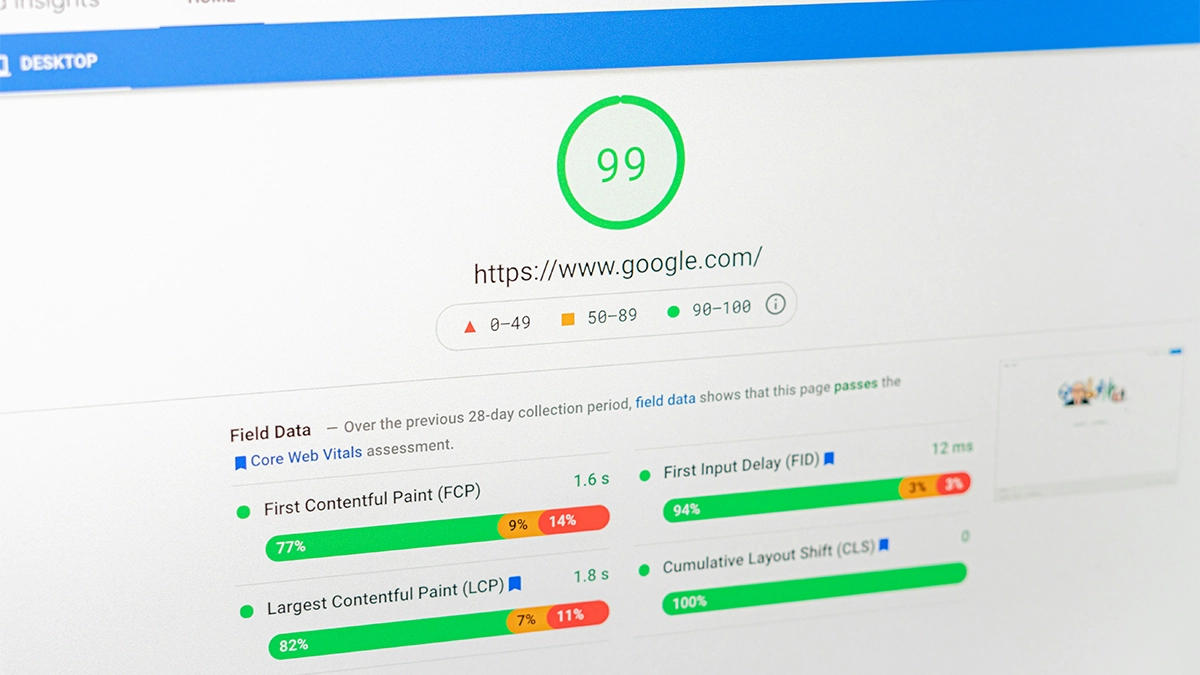
Speed matters more than people think.
If your website takes too long to load, users leave. It’s that simple.
Search engines like Google also use page speed as a ranking factor, meaning faster websites tend to rank higher in search results.
Ideal Load Times
- 1 Second or Less:
For an optimal user experience, aim for load times of 1 second or less, especially for mobile users. This speed is particularly important for e-commerce websites, where fast load times can significantly impact conversion rates. - Under 2 Seconds:
After 2 seconds that probability of users leaving your website dramatically increased.
Common Causes
- Using “drag-and-drop” page builder
- Large image files
- Too many plugins
- Slow or low hosting resources
How to Fix It
- Compress your images, and serve them in web optimised formats such as WebP
- Limit any unnecessary plugins or code
- Make sure your hosting package fits the size of your website.
How Do You Measure Your Website Speed
- Google PageSpeed Insights:
This free tool analyses the content of your web pages and provides suggestions to make them faster. It gives separate scores for mobile and desktop performance. - GTmetrix:
Provides detailed insights on how well your website loads and offers recommendations for improving speed. It includes waterfall charts and performance scores.
3. Ignoring Accessibility
Accessibility isn’t just a “nice to have”. It’s part of good design.
If people struggle to use your website, they won’t stick around.
Google doesn’t necessarily consider accessibility as a factor when ranking your website, but it does consider the user journey.
Websites that have taken accessibility into consideration tend to have better user experiences, leading to increased engagement, lower bounce rates, and improved SEO performance indirectly.
Accessibility Encompasses a Range of Disabilities
- Visual
- Auditory
- Physical
- Speech
- Cognitive
- Neurological impairments
Common Mistakes
- Lack of colour contrast
- Ignoring screen reader compatibility
- Missing alt text on images
- Complex navigation and forms
- No captions on videos
Understand Accessibility Guidelines
Familiarise yourself with the Web Content Accessibility Guidelines (WCAG) published by the World Wide Web Consortium (W3C).
These guidelines provide a framework for making web content more accessible to users with disabilities.
WCAG outlines four principles that web content should be perceivable, operable, understandable, and robust (POUR). Each principle has specific guidelines and success criteria that outline best practices for accessibility.
4. Confusing Navigation
If users can’t find what they’re looking for, they leave.
Your navigation should feel obvious. Not clever.
When designing your website’s navigation you have to consider it from your potential customer’s point of view.
You might create something that you understand, being a subject matter expert, but consider someone who might not know anything about the subject and is landing on your website for the first time.
How will they go about navigating it with some understanding?
What to Avoid
- Too many menu items
- Hidden menus on desktop
- Vague labels like “Stuff” or “Things”
- Broken links
How to Fix It
- Keep your main menu simple (5–7 items max)
- Use clear labels like “Services” or “Contact”
- Keep navigation consistent across pages
- Add a search function
5. Using Poor Quality Images
Images make or break a website!
Using low-quality images instantly make your website feel unprofessional.
How to Fix It
- Use high-quality, relevant images
- Keep a consistent style
- Optimise images so they don’t slow your site down
- Be careful of stock images
Where to Find Good Stock Images
1. Free Stock Photo Websites
2. Paid Stock Photo Websites
6. No Clear Call to Action (CTA)
Every website should guide users towards something.
If you don’t tell people what to do next, they’ll do nothing.
- For e-commerce the ultimate goal is to get the user to buy a product
- a services website would want users to get in contact
- even for blogs the goal may be for the user to sign up for a newsletter.
All websites have an end goal in mind, and clear and compelling call-to-actions (CTAs) are crucial for guiding visitors towards those desired actions.
Examples of Clear CTAs
- “Get a Quote”
- “Book a Call”
- “Shop Now”
- “Download the Guide”
Tips for Creating Effective CTAs
- Use Action-Oriented Language:
Use strong action verbs that encourage users to take immediate steps, such as “Get,” “Download,” “Join,” “Start,” and “Discover.” - Be Clear and Specific:
Clearly communicates what the user will get or what action they are taking. Avoid vague language. - Highlight Benefits:
Explain what the user will gain by clicking on the CTA. Whether it’s gaining access to exclusive content, a free trial, or a helpful resource, make it clear. - Create a Sense of Urgency:
Phrases like “Now,” “Today,” “Limited Time,” or “Within 24 Hours” can encourage users to act quickly. - Ensure Visibility:
Your CTA should stand out on the page. Use contrasting colours, larger fonts, or buttons to make sure it catches the user’s eye. - Place Strategically:
Position your CTA where users are most likely to see and interact with it, such as at the end of a blog post, in the header or footer, or prominently on a landing page.
7. Overcomplicating the Design
It’s tempting to add everything.
Animations. Effects. Fancy layouts.
But more doesn’t mean better.
Keys to a Simple Design
- Ample White Space:
Allows content to breathe and improves readability. - Clear Navigation:
Intuitive menu and navigation elements for easy browsing. - Consistent Visual Language:
Uniformity in typography, colour scheme, and design elements. - Focused Messaging:
Concise and clear communication of key information or product benefits. - User-Centric Design:
Prioritising user needs and usability throughout the website.
Need help wit your website design?
Check out our web design services
8. Ignoring SEO Basics
A great website is useless if no one can find it.
You don’t need to be an SEO expert, but the basics matter.
Why It Matters:
Good SEO practices improve your site’s visibility in search engine results, leading to more traffic and potential customers. Without proper SEO, your site may struggle to attract visitors.
Quick overview of SEO
- On-Page SEO
Title Tags: Include relevant keywords in your title tags (<title> tag).
Meta Descriptions: Write compelling meta descriptions that summarise your page content and encourage clicks.
Headers (H1, H2, H3): Use headers to structure your content logically and include keywords where appropriate.
URL Structure: Use clean, descriptive URLs that include keywords if possible. - Technical SEO
Ensure your website is mobile-friendly and loads quickly.
Optimise images with alt text to describe them to search engines.
Use HTTPS to secure your website. - User Experience (UX)
Improve user experience with clear navigation, easy-to-read content, and fast loading times.
Reduce bounce rates by providing relevant and engaging content. - Link Building
Build high-quality backlinks from reputable and relevant websites.
Internal linking: Link related content within your site to improve navigation and spread link equity. - Local SEO (if applicable)
Optimise your website for local search if you have a physical location.
Claim and optimise your Google My Business listing.
9. Not Securing Your Website

Security is often overlooked… until something goes wrong.
And when it does, it’s expensive.
A security breach can lead to data loss, legal issues, and a damaged reputation.
How To Secure Your Website
- Use HTTPS:
Install an SSL (Secure Sockets Layer) certificate from a trusted Certificate Authority (CA) to enable HTTPS. Many web hosting providers offer free SSL certificates. - Keep Software Updated:
Keep your Content Management System (CMS), such as WordPress, Joomla, or Drupal, and any plugins or themes, up to date with the latest security patches and updates. - Use Strong Passwords:
Enforce strong password policies for user accounts, requiring a combination of uppercase and lowercase letters, numbers, and special characters. Implement MFA for admin and user logins where possible. - Regular Backups:
This ensures you can restore your website quickly in case of data loss or a security breach. Use automated backup solutions provided by your web hosting provider or third-party services to simplify the process. - Use a Security Plugin:
Depending on your CMS, install security plugins that offer features such as malware scanning, file integrity monitoring, and brute-force attack protection.
10. Not Tracking Performance

If you’re not tracking your website, you’re guessing.
And guessing doesn’t grow a business.
What to Track
- Traffic sources
- Popular pages
- Conversion rates
- Bounce rates
What to Track
- Traffic Sources:
This helps identify where your website visitors are coming from and where to focus your marketing efforts. - Popular Pages:
understand what content resonates the most with your audience. - Conversion Rate:
The percentage of visitors who complete a desired action (e.g., making a purchase, or filling out a contact form). - SEO Performance:
Measure your website’s visibility and performance in search engine results in order to guide your SEO strategy. - Bounce Rate:
Understand the number of users that leave your website without performing any action. - Site Speed:
Measure how quickly your website loads for users.
Bonus: Letting Your Website Go Stale
A website isn’t a one-time project.
It needs regular updates to stay relevant.
How Often You Should Update Your Website
- Regular Updates:
Aim to update your website content regularly to keep it fresh and engaging for your audience. A good minimum is to at least refresh or create new content every month. - Critical Updates:
Certain types of content may require more frequent updates. For example, product information, pricing, and company news should be updated as soon as changes occur. - Seasonal or Event-Based Updates:
Plan updates around seasonal promotions, events, or holidays relevant to your business. This helps capitalise on timely opportunities and maintain relevance.
Final Thoughts
Avoiding these website mistakes isn’t about being perfect, rather it’s about getting the fundamentals right.
If your website:
- Works on mobile
- Loads quickly
- Is easy to use
- Guides users clearly
…you’re already ahead of most businesses.
Need Help Fixing the Foundations?
If you’ve spotted a few of these mistakes on your own website, don’t panic. Most website issues can be fixed with better structure, clearer content, improved performance and a more thoughtful user journey.
We help local businesses build websites that are easier to use, easier to manage and designed around clear actions. If you need web design in Newark or web design in Grantham, we can help you get the basics right from the start.
Contact us and tell us what’s not working.