You can film a beautiful social media video and still get no enquiries from it.
The lighting might look great. The shots might feel smooth. The music might fit perfectly. Your logo might even glide onto the screen with the kind of confidence usually reserved for a Hollywood studio.
But if the video does not grab the right person, communicate one clear message, and give them a reason to act, it will probably not convert.
That is the key difference between a nice video and an effective video ad.
When you create organic social media content, you might want views, comments or general awareness. But when you spend money promoting a video through Facebook and Instagram, you usually want something more specific. You may want an enquiry, booking, sale, call, application or email sign-up.
Therefore, you need to plan the video around that action from the beginning. You can’t simply film a general business video, add a “Contact us” screen at the end and hope Meta does the rest.
In this guide, we will explain how to plan and film Meta video ads that convert, even if you run a small business, have a modest budget and do not know your aperture from your aspect ratio.
No film degree required.
- What Does It Mean for a Video Ad to Convert?
- Start With the Goal, Not the Camera
- Give Each Video One Clear Message
- Win Attention in the First Few Seconds
- Film Vertically for Facebook and Instagram
- Use Composition to Guide the Viewer’s Attention
- Use a Mix of Wide, Medium and Close-Up Shots
- Show the Result, Not Just the Process
- Choose Real Moments Over Forced Ones
- Get the Lighting Right
- Do Not Treat Sound as an Afterthought
- Add Captions and On-Screen Text
- Build the Video Around a Simple Structure
- Make the Call to Action Specific
- Make Sure the Landing Page Continues the Same Message
- Film More Than One Opening
- Record Enough Footage for the Edit
- Common Video Ad Filming Mistakes
- A Simple Filming Checklist for Small Businesses
- Final Thoughts
What Does It Mean for a Video Ad to Convert?
A conversion happens when someone takes the action you want after seeing your advert.
Depending on your campaign, that action could include:
- Completing an enquiry form
- Calling your business
- Booking an appointment
- Buying a product
- Registering for an event
- Downloading a guide
- Joining your mailing list
- Applying for a service
Views can help, but views alone don’t make an ad successful. Likewise, likes and comments can indicate that people found the content interesting, but they do not automatically translate into revenue.
For example, a local care home could create a video that receives thousands of views. That sounds promising. But if the video doesn’t reassure families, explain the type of care available or make it easy to arrange a visit, those views may not generate any meaningful enquiries.
Before you pick up a camera, decide what you want the viewer to do next. That decision will influence your script, shots, message, call to action and landing page.
Start With the Goal, Not the Camera
It is tempting to begin by making a shot list.
You might think:
- We need a drone shot
- We should show the building
- Let’s film the team laughing
- We need a slow-motion clip of someone making coffee
Those shots may look good. However, they only deserve a place in the video if they support the message and move the viewer closer to taking action.
Instead, start by answering four questions:
- Who should see this advert?
- What problem or need do they have?
- Why should they choose your business?
- What should they do after watching?
Let’s say you run a gym and want more trial bookings. Your audience may feel nervous about joining, worry that they are not fit enough or dislike large, impersonal gyms. In that case, a video full of advanced athletes lifting enormous weights could send the wrong message.
A better advert might show a welcoming coach, a range of members, a friendly introduction and the trial session itself. The composition, people and setting would all support the same idea: you can start here without feeling intimidated.
That message has a much better chance of converting the right person.
Give Each Video One Clear Message
Small businesses often try to fit everything into one advert.
The business has been established for 20 years. It offers six services. It has won an award. Parking is free. The owner has a lovely dog. All of those things might matter, but putting them into one 30-second video creates a muddled message.
Choose one main point instead.
For example:
- Book a free consultation
- Try your first class for free
- Arrange a tour of our facilities
- See how our product solves this problem
- Get a quote for your project
You can then build the entire video around that point. As a result, viewers understand the offer more quickly and know exactly what to do next.
You can always create separate ads for your other messages. In fact, several focused videos will usually give you more useful testing data than one advert trying to cover the entire history of your business before the kettle has boiled.
Win Attention in the First Few Seconds
People don’t open Instagram or Facebook because they can’t wait to watch your advert. They want to catch up, browse Reels, look at photos and possibly spend 25 minutes watching someone restore a rusty garden tool.
Your video interrupts that experience. So, it needs to earn attention quickly.
The opening of your advert is often called the hook. A strong hook gives the right person a reason to stop scrolling and keep watching.
You could open with:
- A question that reflects a real concern
- Recognisable problem
- A strong visual change
- The end result before the process
- A customer speaking about an outcome
- Clear and relevant offer
- A surprising but honest statement
For example, a wedding venue might begin with a striking ceremony setup and the words, “Looking for a relaxed wedding venue in Nottinghamshire?”
A physiotherapy clinic might open with, “Still avoiding the stairs because of knee pain?”
A software startup could show the frustrating manual task first, followed immediately by the faster alternative.
Avoid starting with a long logo animation, an empty building or a generic “Welcome to our company” introduction. Existing customers may recognise your logo. Cold audiences probably will not care yet.
Lead with their world, not yours.
Film Vertically for Facebook and Instagram
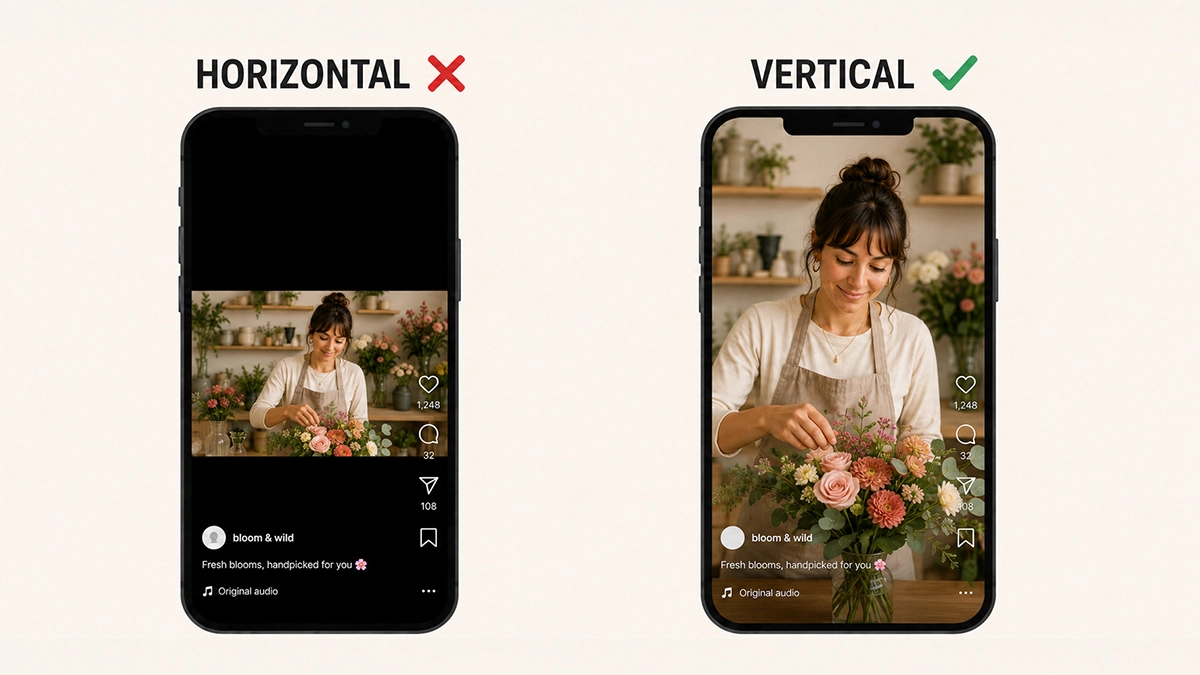
Most people will see your advert on a phone. Consequently, you should plan the video for a mobile screen rather than filming a traditional widescreen video and trying to squeeze it into a Reel later.
For Reels and Stories, film vertically in a 9:16 aspect ratio. This allows the video to fill the screen and gives your content more visual impact.
Meta also recommends keeping important text, faces and branding inside the platform’s safe zones. Buttons, captions and interface elements can cover content near the top or bottom of the screen. If your call to action sits too low, the app may place another button over it. Not ideal when that call to action is the whole point of the advert.
You can review Meta’s guidance on Reels safe zones before planning your graphics and framing.
If you want to use the same footage in different placements, leave a little extra space around the subject. That gives your editor more flexibility when creating square, portrait and landscape versions.
However, do not shoot everything from so far away that the viewer needs binoculars to work out who is speaking.
Use Composition to Guide the Viewer’s Attention
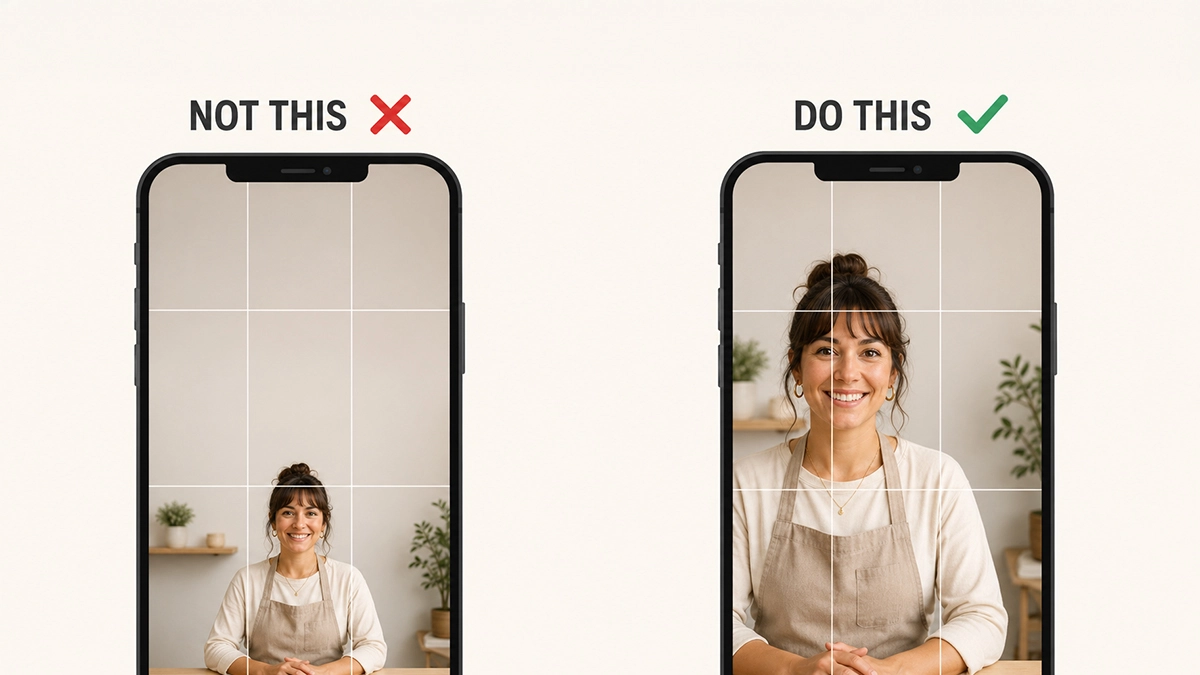
Composition simply means how you arrange people, objects and space within the frame.
Good composition does more than make a video look professional. It tells the viewer where to look, supports the message and removes distractions. For Meta video ads that convert, clarity matters more than showing off every camera technique you know.
Keep the Main Subject Obvious
The viewer should understand the focus of each shot immediately.
If someone speaks to the camera, make sure their face is well lit and large enough to see on a phone. If you demonstrate a product, bring the product close to the camera. If you show a treatment, service or activity, capture the action rather than filming it from the other side of the room.
Before recording, look around the frame. Remove unnecessary boxes, cables, signs, cleaning products or half-finished cups of tea. A busy background competes with your subject and can make the footage feel careless.
Use the Rule of Thirds
Imagine two horizontal and two vertical lines dividing the frame into nine sections. Placing a person or important object near one of the intersections can create a balanced and natural-looking shot.
Most phones and cameras let you display this grid on the screen.
However, treat the rule of thirds as a guide, not a law. A presenter speaking directly to the viewer can also work well in the centre of a vertical frame. The best choice depends on whether you need space for captions, graphics or another person.
Watch the Headroom
Headroom means the space above a person’s head.
Too much space makes the subject look small. Too little can make the shot feel cramped. Leave enough room for a comfortable frame, then check where any headline or caption will appear.
Also, avoid cropping people awkwardly at joints such as the knees, ankles or elbows. A mid-shot, from around the waist or chest upwards, often works well for someone speaking to camera.
Create Depth
Try not to place every person directly against a wall. Moving the subject forward can create separation between them and the background. It also gives the image more depth and helps the viewer focus on the person.
You can add depth by including a relevant object in the foreground, filming through a doorway or showing activity behind the main subject. Nevertheless, keep those elements subtle. They should support the scene rather than steal it.
Match the Eyeline
If someone speaks directly to potential customers, ask them to look into the camera lens. This creates a sense of eye contact and makes the message feel personal.
If you are filming an interview, position the interviewer close to the camera. The speaker can then look off-camera slightly without appearing disconnected from the viewer.
Most importantly, choose one style and use it consistently. Switching between direct-to-camera delivery and an off-camera interview without a clear reason can make the edit feel disjointed.
Use a Mix of Wide, Medium and Close-Up Shots
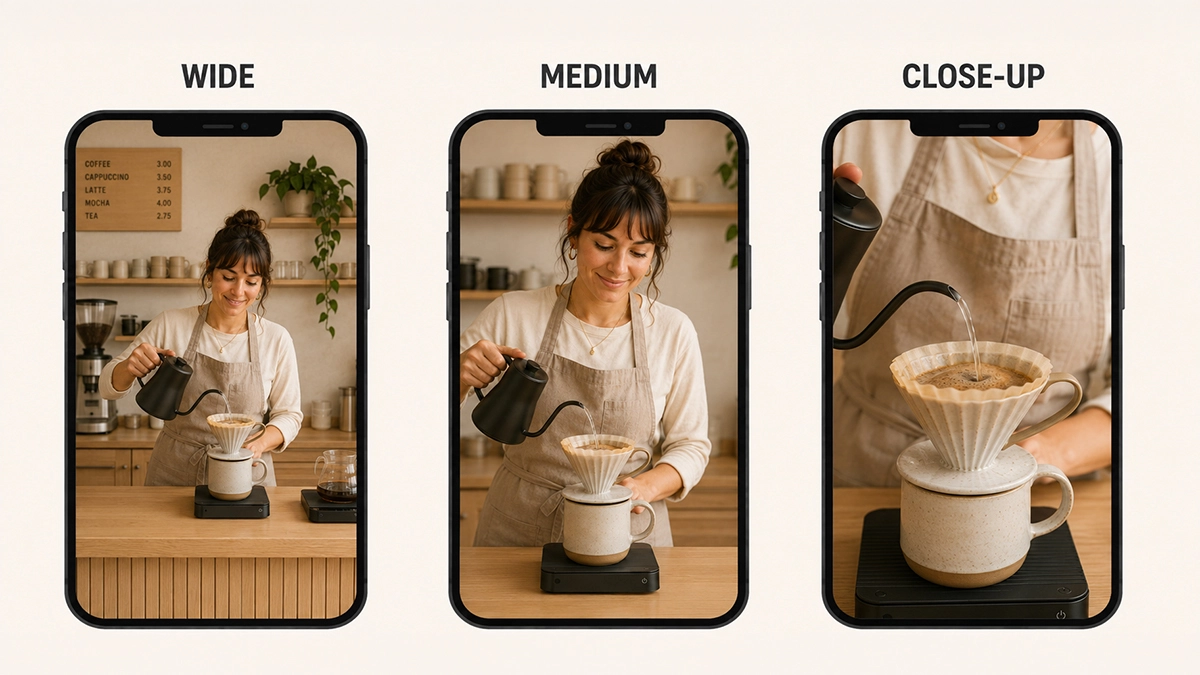
One long clip rarely holds attention for an entire advert. Instead, capture a mixture of shot sizes.
A simple filming sequence could include:
- Wide shot to establish the location
- Medium shot to show a person carrying out the service
- Close-up of their hands, the product or an important detail
- Reaction shot from a customer or team member
- Moving shot to connect different parts of the scene
For example, if you film a restaurant, do not only capture the outside of the building and a wide shot of the dining room. Film the chef preparing a dish, the food arriving at the table, the detail on the plate and the customer’s reaction.
Close-ups often work particularly well on mobile because they make the subject easy to understand on a small screen.
Capture each action from more than one angle where possible. That gives you options in the edit and makes it easier to remove pauses or mistakes from spoken sections.
Show the Result, Not Just the Process
Your business may care deeply about the process. Customers usually care about what that process does for them.
A cleaner should not only show cleaning products and cloths. Show the finished room.
A personal trainer should not only show equipment. Show someone gaining confidence, receiving support or completing a session.
A web designer should not only show a screen full of code. Show the new website on a phone, explain how easy it is to use and connect that improvement to more enquiries.
This approach makes the benefit visible. It also helps the viewer imagine experiencing the result themselves.
Before filming each shot, ask: What does this prove?
If a shot does not demonstrate the problem, solution, experience, evidence or outcome, you may not need it.
Choose Real Moments Over Forced Ones
People can usually spot a staged business video.
You know the sort. Three team members stand around a laptop pointing at a spreadsheet while laughing like it has just told the funniest joke of the year.
Instead, film people doing something real. Ask a staff member to explain part of their normal process. Capture a genuine interaction with a customer. Show the environment while it is active. Film hands carrying out a skilled task.
Authentic doesn’t have to mean unplanned. You should still prepare the location, explain the goal and guide the people involved. But give them an action or a question to respond to rather than asking them to “act natural”. Nothing makes people forget how to behave more quickly than those two words.
Customer testimonials can also provide powerful proof. Keep them specific by asking questions like:
- What problem did you have before working with us?
- Why did you choose us?
- What changed afterwards?
- What would you say to someone considering the service?
Specific answers sound more credible than “They were great. Five stars.”
Get the Lighting Right
You don’t need a van full of expensive lighting equipment, but viewers need to see the subject clearly.
Natural window light can work well. Position the person so the light falls onto their face rather than sitting directly behind them. If you film someone with a bright window in the background, the camera may expose for the window and turn the person into a silhouette.
When filming indoors:
- Face the subject towards a window where possible
- Avoid mixing lots of different light colours
- Turn off harsh overhead lights if they create heavy shadows
- Check for reflections in glasses, screens and shiny products
- Keep the lighting consistent between shots
When filming outside, bright midday sun can create harsh shadows and squinting. An overcast day often gives you softer, more even light. Alternatively, move into open shade while keeping the subject facing the brighter part of the scene.
Finally, tap the subject’s face on your phone screen to set focus and exposure before you record. That one step can prevent a lot of unusable footage.
Do Not Treat Sound as an Afterthought
Poor audio can make professional-looking footage feel amateurish very quickly.
If someone speaks in the video, move the microphone close to them. A small clip-on microphone will usually record clearer speech than a phone placed several metres away.
Before filming, listen for:
- Traffic
- Wind
- Air conditioning
- Music playing in the venue
- Coffee machines
- Nearby conversations
- Echo in large or empty rooms
Record a short test and listen back with headphones. Don’t assume the audio is fine because the person sounded clear while standing next to you.
Music can help set the pace and emotion of an advert. However, it should match the message and audience. A track that feels slow or gloomy can change how viewers interpret otherwise positive footage. Likewise, loud, frantic music may undermine a message built around trust, care or reassurance.
Use music you have permission to include in paid advertising. A song being available for an organic Reel does not automatically mean you can use it commercially in an advert.
Add Captions and On-Screen Text
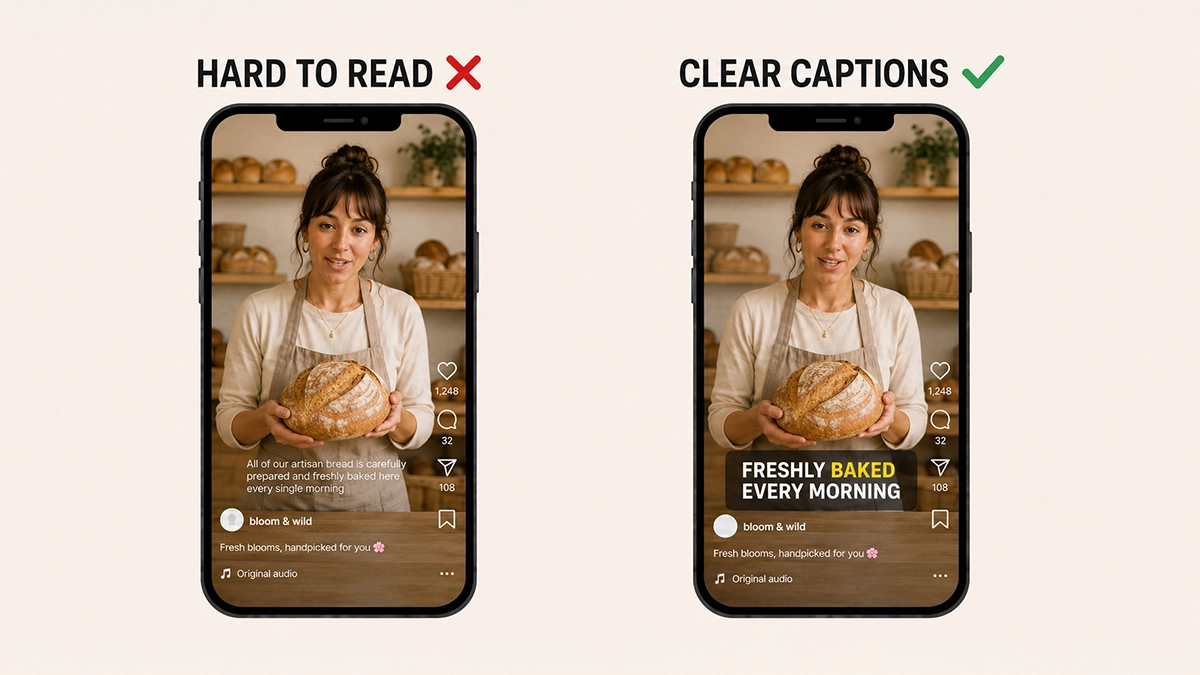
Your video should work with sound, but the main message should not disappear when someone watches quietly.
Captions make spoken content easier to follow and improve accessibility. They also help viewers understand the advert in noisy environments, shared offices or those suspiciously quiet moments when they are meant to be working.
Keep on-screen text short. A phone screen does not give you much space, and viewers will not pause to read a paragraph.
Use text to reinforce:
- The opening hook
- The main benefit
- A useful piece of proof
- The offer
- The call to action
Make the font large enough to read and create strong contrast between the text and background. In addition, keep it inside Meta’s safe zones so interface elements do not cover it.
Build the Video Around a Simple Structure
You don’t need a complicated script. In fact, a simple structure often produces clearer Meta video ads that convert.
Try this five-part framework:
1. Hook
Call out the audience, problem or desired result.
Example: “Finding the right care for someone you love can feel overwhelming.”
2. Problem
Show that you understand the viewer’s concern.
Example: “You want them to feel safe, comfortable and genuinely at home.”
3. Solution
Introduce the service and connect it directly to that concern.
Example: “Our experienced team provides personalised support in a warm, welcoming environment.”
4. Proof
Give the viewer a reason to believe you.
This could include experience, qualifications, a testimonial, a demonstration, real results or footage of the service in action.
5. Call to Action
Tell the viewer what to do next.
Example: “Book a visit and meet the team.”
You don’t need to force every advert into the same format. However, the viewer should understand the problem, why your offer helps and what happens next.
Make the Call to Action Specific
“Learn more” can work as a button, but it is not always a persuasive message.
What will the person learn? What happens after they click? How much effort will it take?
A stronger call to action could be:
- Book your free 15-minute consultation
- Arrange a tour of the home
- Get your personalised quote
- Start your seven-day trial
- View the available dates
- Download the free checklist
Specific calls to action reduce uncertainty. They also help the viewer decide whether the next step feels relevant and manageable.
Include the call to action in the spoken script, on-screen text and advert copy where appropriate. Repetition helps, as long as the message remains natural.
Make Sure the Landing Page Continues the Same Message
The video can’t do everything on its own.
If the advert promises a free consultation but the landing page only talks generally about your business, people may leave. Likewise, if the video feels friendly and reassuring but the form asks for 17 pieces of information, the journey suddenly feels like admin.
Your landing page should repeat the same:
- Offer
- Main benefit
- Visual style
- Audience focus
- Call to action
It should also load quickly on mobile, answer the most obvious questions and make the next step easy.
Think of the advert and landing page as one conversation. The video earns the click. The page helps turn that interest into action.
Film More Than One Opening
Even experienced marketers can’t always predict which hook will perform best.
So, record several versions while you have the people, location and equipment ready. Changing one line or opening shot takes very little time during filming but gives you valuable options later.
For example, you could test:
- A question against a direct statement
- Person speaking against an action-led opening
- Customer concern against a positive outcome
- Short version against a longer explanation
- A testimonial against a business-led introduction
Keep the main body of the advert the same and change the first few seconds. You can then compare which version holds attention and generates conversions.
This approach is far more useful than putting your entire budget behind one video because everybody in the office liked it.
Record Enough Footage for the Edit
Editing can’t create shots that you didn’t film.
Before the shoot, make a list based on the script. Then, record more supporting footage than you think you need.
For each activity:
- Film the complete action in a wide shot.
- Repeat it in a medium shot.
- Capture close-ups of the important details.
- Record the person’s reaction or the finished result.
Hold each shot steady for a few seconds before and after the action. This gives the editor space to cut cleanly.
Also, check your footage as you go. Look for missed focus, awkward expressions, distracting backgrounds and unwanted reflections. Discovering a problem on location takes a minute to fix. Discovering it afterwards may mean another shoot.
read more
Video Editing Software for beginners
Common Video Ad Filming Mistakes
Small mistakes can weaken an otherwise strong advert. Watch out for these common problems.
Starting With the Business
“We are a family-run company established in 2008” may be true, but it rarely creates an immediate reason to keep watching.
Start with the customer’s situation, then introduce the business when it becomes relevant.
Filming Everything in Landscape
Landscape footage can work on websites and YouTube. However, it often leaves space or requires heavy cropping in vertical Meta placements.
Plan for the placement before filming.
Showing Too Much Empty Space
Wide shots help establish a location, but too many can make people and products look tiny on a phone. Move closer and capture the details.
Using One Repetitive Shot
Even a good shot loses impact when it stays on screen for too long. Use relevant cutaways and changes in shot size to maintain interest.
Forgetting the Offer
Some adverts explain the business beautifully but never give the viewer a reason to act now. Make the offer and next step clear.
Trying to Look Too Polished
Professional quality matters. Nevertheless, overproduced footage can sometimes feel less natural in a social feed. Aim for clear, confident and credible rather than making every advert look like a television commercial.
Assuming the First Version Will Win
Your first video is a starting point. Test hooks, messages, calls to action and edits. Then use real campaign results to guide the next version.
A Simple Filming Checklist for Small Businesses
Before the shoot:
- Choose one conversion goal
- Define the audience
- Write one clear message
- Plan the hook, proof and call to action
- Create a practical shot list
- Prepare the location
- Get permission from everyone appearing on camera
- Check that you can use the music and other assets commercially
During the shoot:
- Film vertically for Reels and Stories
- Keep important content inside the safe zones
- Clean the camera lens
- Check focus and exposure
- Record a sound test
- Capture wide, medium and close-up shots
- Film real actions and outcomes
- Record several hooks
- Review important clips before leaving
After the shoot:
- Keep the edit focused on one message
- Add clear captions
- Use readable on-screen text
- Match the music to the intended emotion
- End with a specific call to action
- Check the video on a phone
- Create alternative versions for testing
- Send viewers to a relevant landing page
- Track enquiries, bookings or sales rather than views alone
Final Thoughts
The best-looking video is not always the best-performing advert.
Strong Meta video ads that convert usually make the viewer feel understood. They introduce a relevant problem or goal, show a believable solution, provide a reason to trust the business and make the next step obvious.
Good filming supports that journey.
Composition directs attention. Close-ups make details clear. Lighting builds quality and trust. Clean audio keeps the message easy to follow. A strong hook earns the next few seconds. Finally, a specific call to action turns passive viewing into a possible enquiry.
You do not need the largest budget, the most expensive camera or a suspicious number of slow-motion drone shots. You need a clear goal, a useful message and footage that shows the right customer why they should care.
Start there. Keep the video focused. Test what works. Then improve the next one using real results rather than guesswork.
And if you would rather concentrate on running your business than planning shot lists, filming several versions and working out what belongs in a Meta safe zone, our videography and social media services can help you create content with a clear purpose behind it.